✂️ AI Video · Clipping
AI Video Clipping for Short-Form Content: How It Works and Which Tool Fits
Long videos hide short ones. A one-hour podcast may contain five moments that would work as a 30-second clip, but finding and cutting them by hand takes hours. AI video clipping tools automate the search, the cut, the vertical reframe and the captions. This guide explains how they work, compares the main tools with real prices and gives you a quality checklist so you publish clips you would be proud of.
✅ Short answer: Pick a tool that matches how you measure usage (clips, source minutes or videos), test it on one real episode, and review every clip for the hook, captions and framing before you post. Treat any "virality score" as a hint, not a result.
Short answer: what AI clipping does and does not do
These tools do three jobs: choose moments, reframe from landscape to portrait and add captions. They do not know your audience, your brand voice or whether a joke lands. That is why the best workflow is AI for the first cut and a human for the final decision. Our three-way comparison in Klap vs OpusClip vs Vizard goes deeper on the big three.
How AI clipping works
- Transcribe. The tool converts speech to text, which is why it needs spoken content such as podcasts, interviews and tutorials.
- Select. It scores segments, looking for moments that open with a hook and finish a complete idea. Klap describes this as choosing the strongest topics, and OpusClip adds a virality score.
- Reframe. It crops or rearranges the picture for a vertical screen, tracking the speaker. Klap calls its newer version AI Reframe 2 and lists layouts such as split screen, screencast and gaming.
- Caption. It adds word-synced subtitles, often with suggested post captions.
- Export or publish. You download clips or post directly, depending on the plan.
The tools compared
| Tool | Price (as listed) | What you are metered on | Notes |
|---|---|---|---|
| OpusClip | Free $0; Starter $15/mo; Pro $29/mo | 1 credit = 1 minute of source: 60, 150 or 300 a month | Free plan watermarks captions; Pro adds longer export window |
| Vizard | Free $0; Creator $29/mo; Business $39/mo (May 2025, competitor source) | Upload minutes: 60 free, 600 on Creator | Older figure from a competitor's review, so verify |
| Submagic | Starter $19/mo; Pro $39; Business + API $69 | Videos a month: 15, 40 or 100 | Captions-led; 2, 5 or 30 minute video limits; free trial |
| CapCut | Free; Pro $19.99/mo ($15 yearly) | No clip meter listed | AI Clipper and Smart Auto-Reframe; annual price rose in January 2026 |
| Descript | Free; Hobbyist $24/mo ($16 yearly) | Media minutes: 60 on free | Edit video by editing the transcript |
| Adobe Premiere Pro | $22.99/mo annual (first-year rate) | None | Auto Reframe; steep learning curve |
| Klap | Basic $14.50/mo yearly ($29 monthly); Pro $39.50 ($79); Pro+ $94.50 ($189) | 100, 300 or 1,000 clips a month | Free trial on 1 video, no card, downloads need a paid plan; 99+ languages; AI Reframe 2 layouts; direct posting to TikTok, YouTube, Instagram, LinkedIn and Facebook (vendor page) |
Sources: Klap's pricing page (November 2026), an OpusClip pricing review verified August 20, 2026, Toolradar's Submagic page (November 9, 2026) and a February 2026 editing roundup updated October 2026. Confirm every price on the vendor site.
Klap lets you try one video free before you pay. Its pricing page is ambiguous about which figures are yearly and which are monthly, but a November 2026 review lists Basic at $29, Pro at $79 and Pro+ at $189 per month with a 50 percent saving on yearly billing, which matches our reading.
Prepare the source video
- Clean audio wins. Transcription and clip selection both depend on it.
- Clear speech beats music or screens. One review suggests testing slide-heavy footage on a sample first.
- Name speakers and terms. Keep a short list of names and jargon to check in captions.
- Trim dead air first. A tight source gives tighter clips and fewer wasted credits.
A seven-step clipping workflow
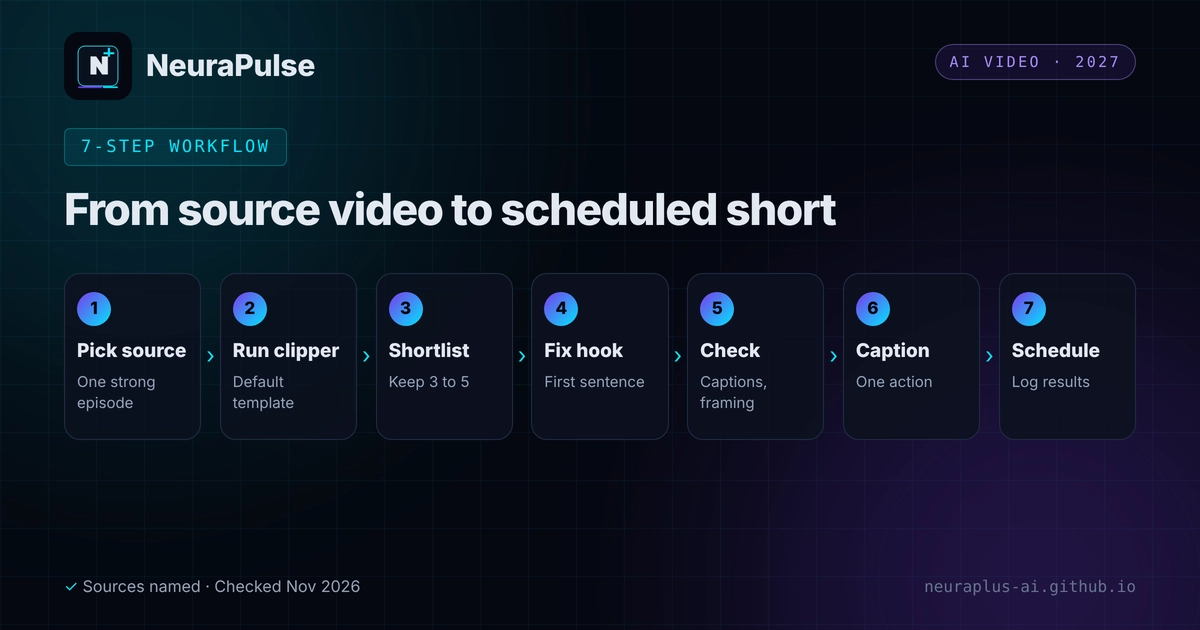
- Pick one source. A recent episode or tutorial with a clear idea.
- Run the clipper. Start with the default settings and one brand template.
- Shortlist. Keep three to five candidates and drop the rest.
- Fix the hook. The first sentence must make sense without context.
- Check captions and framing. Names, jargon, speaker position and any on-screen text.
- Add the post caption and call to action. One action per clip.
- Schedule and log. Record the clip, post date and results in a sheet.
The quality checklist
- Does the first three seconds work with the sound off and on?
- Does the clip finish a thought, not stop mid-sentence?
- Are names, numbers and jargon spelt correctly in the captions?
- Is the speaker framed, and is nothing important cropped?
- Would a stranger understand it without the full episode?
- Is there a clear reason to follow, watch more or click?
Your first-week plan
- Day 1. Run one episode through one tool and shortlist clips.
- Days 2 to 4. Post one clip a day and log views, watch time and follows.
- Day 5. Run the same episode through a second tool and compare the shortlist.
- Days 6 to 7. Decide on tool and plan using your log, not the marketing.
To compare costs before you subscribe, read AI video clipping pricing 2027. To process many videos, see the batch processing guide. If you are weighing AI against manual editing, read AI video clipping vs traditional editors. Looking to earn from the clips? See how to monetize AI content and AI tools for content creators.
💡 Try before you pay: Use the free trials with the same episode and compare the shortlists side by side. The difference between tools on your own content matters more than any feature list.
How this guide was researched
Methodology and limits
- Klap details come from its own pricing page and a November 10, 2026 review that says it rests on company-published information rather than a controlled test. Treat Klap's feature claims as vendor claims.
- OpusClip prices were verified by a third party on August 20, 2026. Vizard figures come from a competitor's May 28, 2025 article and may be out of date.
- We did not run a controlled test of every tool, and we make no ranking of clip quality.
- Author: Prashant Lalwani. Last verified November 20, 2026.