🎮 Fun Tech · Tutorial · Retro Computing
The Google Terminal Easter Egg:
Search Like It's 1985
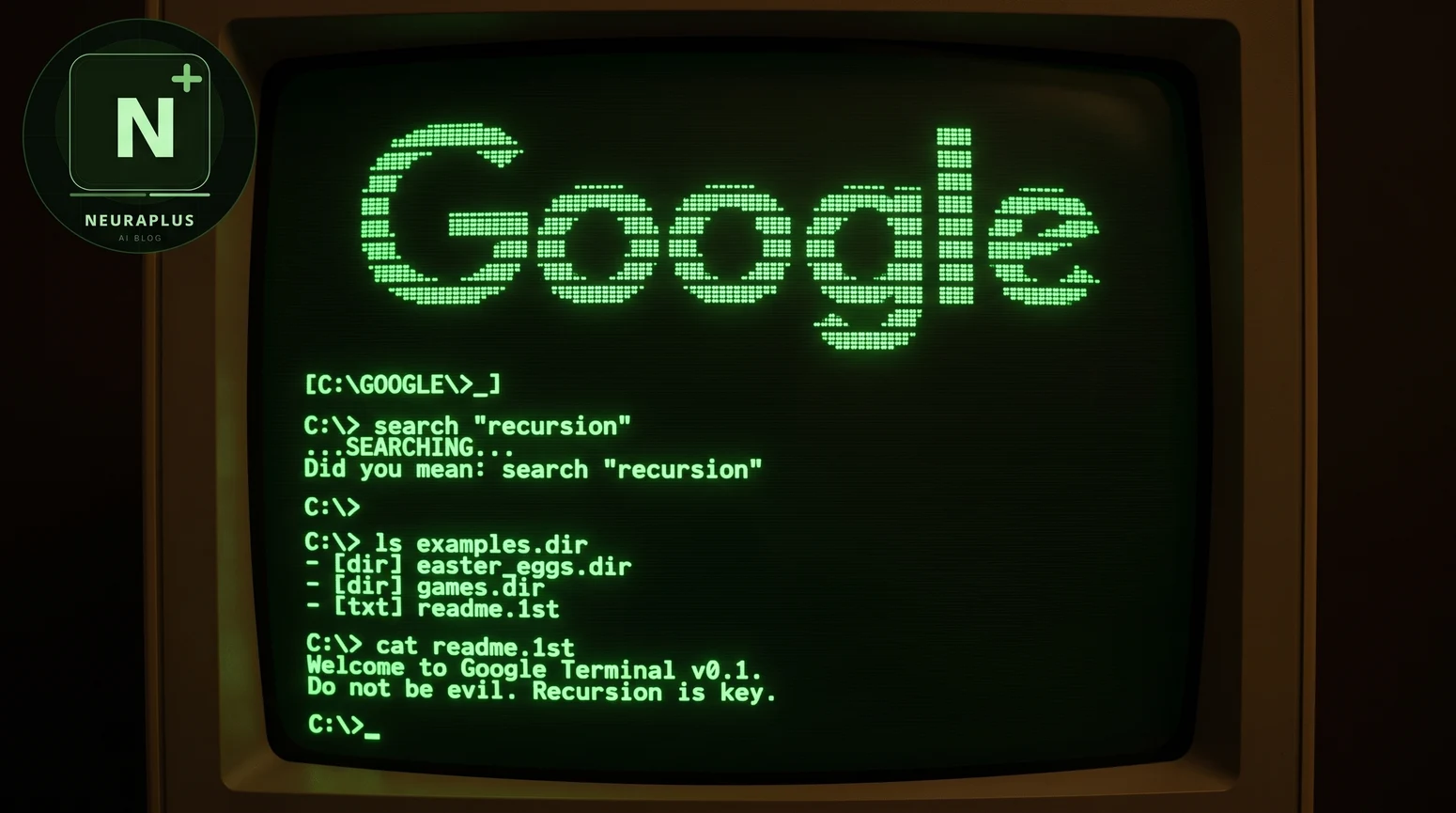
The first time you load this one, it genuinely feels like your browser stepped back forty years. There's a dial-up modem sound, a scrolling boot sequence, and then a Google logo rendered entirely out of glowing green dots — like the screen just booted into a machine from a basement computer lab in 1985. No buttons, no cards, no autocomplete. Just a blinking cursor and a prompt waiting for you to type.
That's Google Terminal, and before we go any further, here's the one thing every guide to this trick should tell you up front and most don't: Google didn't build it. It's a fan project, and understanding who actually made it — and why — is most of what makes it interesting.
🚀 Quick Start: Search "Google Terminal" and open the result from masswerk.at, or go straight to elgooG's mirror. Wait for the modem handshake sound to finish, then type any search term at the blinking prompt.
Who Actually Built This (It's Not Google)
Google Terminal was created in 2012 by N. Landsteiner, a developer who runs the site mass:werk — a personal collection of browser experiments and media-environment projects. It has no official relationship with Google whatsoever. Google didn't fund it, host it, or add it to Search as a hidden feature the way it did with tricks like do a barrel roll or Askew. It lives entirely on Landsteiner's own domain, masswerk.at, and is preserved and mirrored today on the fan-run archive site elgooG.im.
The idea was sparked by a short video from Squirrel-Monkey.com called "If Google were invented in the 1980s," which imagined the search giant reborn as a dial-up bulletin board system. Landsteiner took that joke and actually built it — a working reconstruction of what searching the web might have felt like if Google had launched twenty-five years earlier, in the era of modems, monochrome monitors, and typed commands instead of clicks.
Interactive Guide: How to Access Google Terminal
| Step | Action | What Happens | Pro Tip |
|---|---|---|---|
| 1 | Search | Search "Google Terminal" on Google and open the masswerk.at result, or visit elgooG's mirror directly | Bookmark it — this isn't hidden inside Google itself |
| 2 | Wait | A dial-up modem handshake plays while a BBS-style boot sequence scrolls up the screen | Turn your sound on — the modem tones are half the fun |
| 3 | Type | Once the prompt appears, type any search term and press Enter | Try short, classic terms — results are drawn from a cached example set |
| 4 | Browse | Numbered results print onto the screen. Type a number to open one, or 0 to return home | Everything is keyboard-driven, exactly like a real BBS |
| 5 | Customize | Open the Tools menu to change display color or add CRT scan lines | Amber mode plus scan lines is the most authentic combo |
Why Search Results Aren't "Live" Anymore
When Google Terminal first launched in 2012, it could pull real, live Google Search results and redraw them inside the terminal interface — genuinely searching the web, just displayed as scrolling green text instead of a modern results page. That changed in May 2016, when Google shut down the specific Search API the project depended on. Rather than let the whole thing quietly die, Landsteiner preserved it by switching to a set of cached example searches, so the boot sequence, the modem sound, and the typing experience still work exactly as before — you just get pre-saved results instead of a fresh live search.
This is worth knowing before you try it, because if you type an obscure or very specific query expecting new results, you might just get a "did you mean" prompt pointing back to one of the cached examples. It's not broken — it's a preserved snapshot of a working demo, not a live connection to today's Google index.
⚠️ Common misconception: Google Terminal is often listed alongside genuine Google-built Easter eggs like Zerg Rush or Google Gravity, but it's built and hosted independently by a third-party developer. That doesn't make it any less fun — just worth knowing where the line is.
Controls & Display Options
| Feature | How to Access | What It Does |
|---|---|---|
| Color Display | Tools menu → Color | Default full-color terminal rendering |
| Green Phosphor | Tools menu → Green | Classic monochrome green CRT look |
| Amber Phosphor | Tools menu → Amber | Warm amber monochrome, common on older business terminals |
| Scan Lines | Tools menu → CRT toggle | Adds horizontal scan-line texture for extra realism |
| Virtual Keyboard | Tools menu → Keyboard | On-screen keyboard for mobile or touch devices |
The Companion Project: Google Images Terminal
If plain text search feels too tame, there's a companion piece built on the same idea: Google Images Terminal. It applies the exact same BBS boot sequence and dial-up sound to image search, except the results aren't pictures — they're the pictures redrawn as ASCII art, character by character, the way an old terminal might have tried to represent a photo if it had no way to display real graphics. It's a small, strange, genuinely clever extension of the same joke, and it's built by the same developer, N. Landsteiner, using the same visual and audio language as the original.
Why This Kind of Project Still Matters
There's something worth sitting with here beyond nostalgia. Google Terminal exists because one developer took a joke video seriously enough to actually build it — recreating boot sequences, dial-up tones, and a full command-line search flow just to answer a "what if" question nobody asked them to answer. That's a different kind of Easter egg than the ones Google ships itself. It's not a corporate feature meant to boost engagement metrics; it's closer to digital folk art, built by someone who cared about a very specific slice of computing history and wanted other people to feel it too.
It's also a small, useful reminder for anyone building on the modern web today. The best interactive experiences — whether that's a retro terminal simulator or a genuinely useful local AI tool — often come from someone caring enough about a specific detail to get it exactly right, even when nobody's paying them to. That's the same spirit behind good prompt engineering: small, deliberate craft, applied consistently, is what actually makes something feel alive instead of generic.
Other Hidden Google Tricks Worth Trying
If a retro BBS terminal is your kind of thing, it pairs well with the rest of Google's playful side — most of which, unlike this one, actually is built and maintained by Google itself. Google Gravity lets you drag the entire homepage apart with simulated physics. Do a barrel roll spins the results page in a single satisfying second. Askew quietly tilts the whole page a few degrees just to mess with you, and Zerg Rush turns your search results into a tiny defense game against swarming letters. Each one, including this terminal, is proof that even the most serious piece of software on the internet has room for someone's sense of humor.
Frequently Asked Questions
✅ Try it right now: Search "Google Terminal," open the masswerk.at result, turn your sound on, and let the modem dial in. It's the closest thing on the modern web to actually touching a 1985 computer.