📝 Prompt Engineering · Claude · AI Tools
Claude Master Prompt Template You Can Copy and Reuse
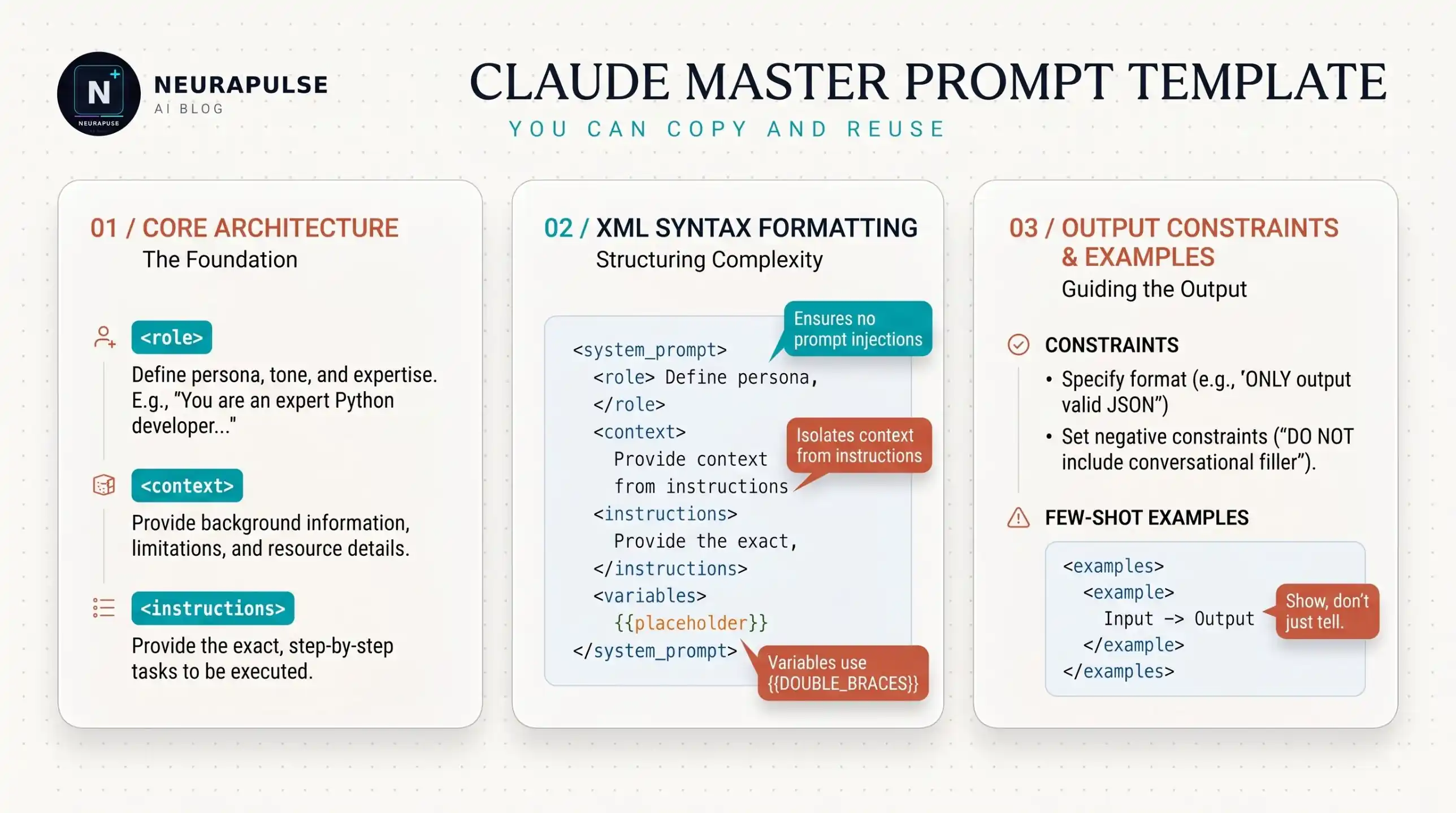
Most weak answers from Claude come from thin prompts, not a weak model. "Write a blog post about budgeting" leaves Claude to guess your audience, length, tone and format, and it guesses the average of everyone who might have asked. A master prompt template fixes that by giving you one structure to fill in every time, so you stop forgetting the details that matter.
The Claude master prompt template
Copy this, replace the bracketed parts, and delete any section you don't need. A good master prompt tells Claude who it's working as, what the situation is, exactly what to produce, what to avoid, and what the finished answer should look like.
<role>
You are [a specific role, e.g. a senior copy editor for a personal finance blog].
</role>

<context>
[Who the reader is, what they already know, where this will be used,
and anything Claude can't guess. Paste source material here.]
</context>

<task>
[One clear job. Start with a verb: Write, Rewrite, Summarize, Compare, Review.]
</task>

<rules>
- [Tone, e.g. plain, direct, no jargon]
- [Length, e.g. 400 to 500 words]
- [Things to avoid, e.g. no bullet points, no clichés]
- If you're missing information, ask me before you start.
</rules>

<example>
[Optional: paste one sample of the style or format you want.]
</example>

<output_format>
[Exactly how the answer should look: headings, a table, JSON, plain paragraphs.]
</output_format>
That's the whole template. Everything below explains why each piece earns its place.
Why each section matters
| Section | What It Does | Skip It and You Get |
|---|---|---|
| Role | Sets the point of view and level of expertise | Generic, middle-of-the-road answers |
| Context | Supplies facts Claude can't guess | Confident answers built on wrong assumptions |
| Task | States the single job | A bit of everything and not enough of anything |
| Rules | Sets tone, length and limits | Output you have to trim or rewrite |
| Example | Shows the style you want | Style that drifts from what you had in mind |
| Output format | Defines the shape of the answer | Walls of text when you needed a table |
💡 About the tags: The tags themselves are the part people question. Anthropic's own prompting guidance recommends separating the parts of a prompt with XML-style tags, because it helps Claude tell your instructions apart from the material you paste in. The names of the tags don't matter. Consistency does.
A filled-in example
Here's the template with real content. The job: turn a messy set of meeting notes into something a manager can scan.
<role>
You are an operations analyst who writes crisp meeting summaries
for busy managers.
</role>

<context>
These are raw notes from a 45-minute product planning meeting.
The reader is a director who wasn't there and has two minutes.
Notes: [paste notes here]
</context>

<task>
Summarize the meeting and list the decisions and open questions.
</task>

<rules>
- Keep it under 200 words.
- Use plain language, no filler.
- Name an owner for every action item. If the notes don't name one,
  write "Owner not stated" instead of guessing.
- If something is ambiguous, ask me before you answer.
</rules>

<output_format>
Three headings: Summary, Decisions, Open questions.
Under Decisions, use a table with columns: Decision, Owner, Due date.
</output_format>
🔍 Notice what the rules do: "Owner not stated" stops Claude from inventing names, which is one of the quieter ways summaries go wrong. And "ask me before you answer" gives Claude permission to check instead of bluffing.
Five habits that make any template work better
Be specific about the reader
"Write for beginners" is vague. "Write for someone who has never opened a spreadsheet" gives Claude a floor to start from.
Say what to avoid, and say it concretely
"Don't be repetitive" does little. "Don't restate the question in the first sentence" does a lot.
Give one example, not ten
A single sample shows the style. Several samples can lock Claude into copying their exact phrasing.
Ask for the format you'll actually use
If the answer is going into a spreadsheet, ask for a table or CSV. If it's going into an email, ask for plain paragraphs with no markdown.
Paste real material instead of describing it
A summary of a summary loses detail. Claude works from what's in front of it.
Fixing a weak answer without starting over
When the first answer misses, resist rewriting the whole prompt. Diagnose it first.
| What Went Wrong | What It Usually Means | Fix |
|---|---|---|
| Too generic | Role and context were thin | Add the reader and the use case |
| Too long | No length rule | Add a word limit and a format |
| Wrong tone | Tone wasn't stated | Add tone rules plus one example |
| Made things up | Missing source material | Paste the source and add "use only the text I gave you" |
| Ignored a rule | Rules buried in a long paragraph | Move rules to a short list and put the key one last |
| Wrong structure | Output format missing | Spell out headings, columns or fields |
🔄 Pro tip: Reply in the same chat with the specific fix instead of starting a new one. Claude keeps the context, so "Same thing, but under 120 words and with a table" works well.
Shortening the template for everyday use
You don't need all six sections every time. For a quick question, three lines do the job: the role, the task and one rule. Keep the full version for work you'll reuse, like weekly reports, client emails or study notes, and save it as a note you can paste in. If you use Claude's free plan, a tighter prompt also helps you stay inside your usage window, because fewer retries mean fewer messages spent. The Claude free plan limits guide explains how that window works.
Using the same template with other models
The structure isn't Claude-only. A role, context, task, rules and format work on most chat models, though each one has its own quirks. If you run models on your own machine, you can try the same template after you install Ollama on Windows, and the Ollama vs LM Studio comparison can help you pick the app that fits you. If you'd rather call a hosted model from code, the Groq API free limits show what a free key allows. Smaller local models follow long instructions less reliably, so shorten the template and put the most important rule last.
✅ Bottom line: Most weak Claude answers come from thin prompts, not a weak model. One master template — role, context, task, rules, optional example, output format — covers almost every job. Fill it in once, save it as a note, and reuse it until the task changes.
Frequently asked questions
Further reading
- Anthropic prompt engineering overview – the official guidance on clear instructions, examples, XML tags and output formats.