AI Video
How to Convert Webinars to Shorts With AI: A Step-by-Step Workflow

A one-hour webinar usually contains five or six moments worth sharing: a sharp answer, a surprising number, a short story. AI clipping tools can find candidates in minutes, but webinars have their own traps: wide slides, long pauses and speakers who never agreed to be a clip. This guide gives a workflow that handles them and a minute budget you can check.
✅ Short answer: Upload the recording, let the AI propose clips, choose moments that stand alone in under three minutes, fix the framing and captions, then link back to the full replay. Budget in minutes, because both tools below bill by upload time.
What YouTube actually requires
YouTube Help says Shorts can run up to three minutes, and that only videos with a square or vertical aspect ratio count as Shorts. A widescreen webinar clip uploaded as is will be a normal video, not a Short. The three-minute rule applies to standard channels for uploads on or after October 15, 2024.
The six-step workflow
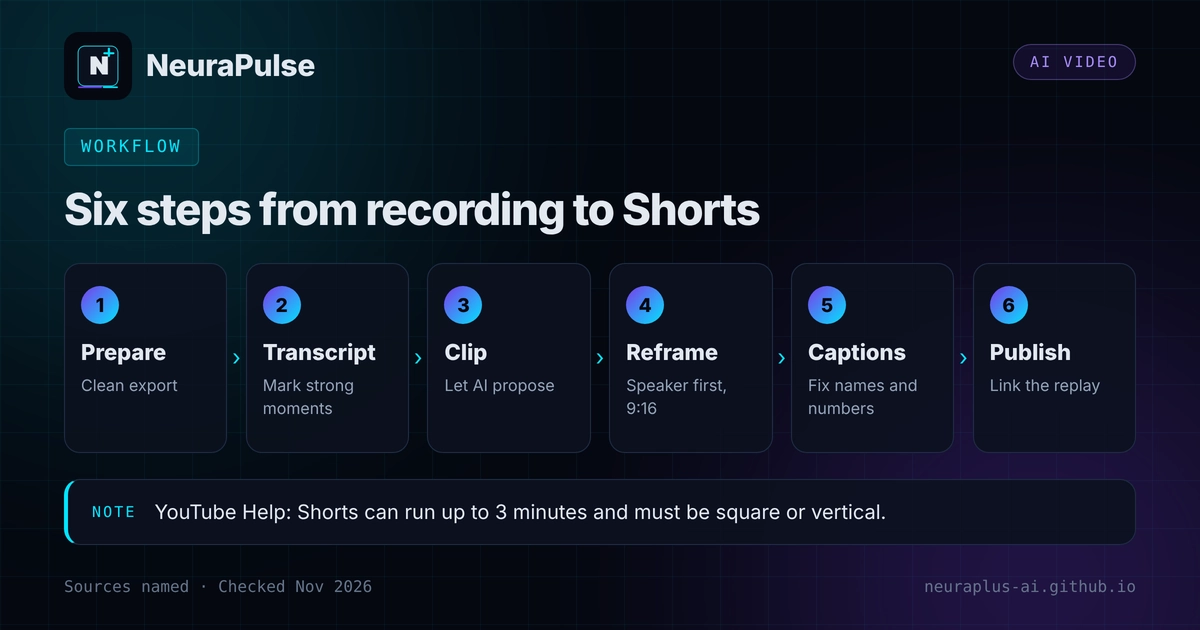
- Prepare the recording. Use the cleanest export your webinar tool gives, and keep audio and video in sync.
- Get a transcript. Skim it first and mark questions answered well, numbers, stories and bold claims.
- Run the clipper. Let the AI propose clips, then pick the ones that make sense with no context.
- Reframe. Switch to a vertical layout, keep the speaker's face in view, and zoom into slide detail only when it is readable on a phone.
- Edit captions. Fix names, product terms and numbers. Auto-captions often miss them.
- Publish with a pointer. Add a clear call to watch the full replay, and schedule clips across a week.
Which moments make good Shorts
- A direct answer to one question, ideally under a minute.
- A single number or finding with one sentence of context.
- A short story with a beginning and an end.
- A before-and-after demo, if the screen is readable on a phone.
Skip clips that need the previous ten minutes, depend on a slide full of text or include attendee names.
Tool prices and minute budgets
| Tool | Published price | Minutes included | One-hour webinars per month (ours) |
|---|---|---|---|
| OpusClip Free | $0; watermarked on caption templates | 60 credits (1 per minute) | 1 |
| OpusClip Starter / Pro | $15 monthly only / $29 monthly or $14.50 a month annual | 150 / 300 | 2 / 5 |
| Cut.Pro (competitor, publisher of one source) | R$69.90 a month Plus | 1,000 credits | 16 |
| Klap | Basic $29 monthly or $14 annual; Pro $79 or $39; Pro+ $189 or $94 | 300 / 900 / 2,700 minutes | 5 / 15 / 45 |
Sources: OpusClip plan details verified August 20, 2026 by Castmagic; Klap and Cut.Pro prices checked September 26, 2026 by Cut.Pro, itself a competitor. A static Klap page still showed a clip-based allowance, so confirm the billing unit at checkout. Per-webinar counts are our arithmetic.
What a webinar costs to clip
Dividing a plan by the webinars it covers gives a rough cost per recording hour (our arithmetic, monthly billing). OpusClip Pro is $29 for 300 minutes, or about $5.80 per hour; Starter is $15 for 150 minutes, or $6 per hour. Klap Basic is $29 for 300 minutes, also about $5.80 per hour, and about $2.80 on annual billing. The tool cost is small. Your review time is the real expense. Our AI video clipping pricing guide and the Klap vs Opus Clip vs Vizard comparison go further.
Webinar-specific problems to plan for
- Screen shares. A wide slide shrinks to unreadable in 9:16. Show the speaker, and quote the key line as a caption.
- Long pauses and "can you hear me". Trim them, or choose a later section.
- Consent. Check speaker releases and what attendees agreed to before publishing.
- Language and jargon. Auto-captions stumble on product names. Proofread every one.
- Batching. If you run webinars weekly, see our batch processing guide.
When a human editor is still better
AI picks moments by speech patterns, not by what matters to your business. For launch announcements, regulated claims or executive messages, a person should choose and approve the clips. See AI video clipping vs traditional editors for where each wins, and AI video clipping for short-form content for the broader approach. For channel tools beyond clipping, read AI tools for YouTube creators.
💡 Simple rule: One webinar, six clips, one week of posts. Pick the moments yourself, and let the AI do the cutting.
How this guide was researched
Methodology and limits
- Shorts length and aspect-ratio rules are from YouTube Help's page on three-minute Shorts.
- OpusClip data is from Castmagic (verified August 20, 2026); Klap and Cut.Pro data is from Cut.Pro's comparison (September 26, 2026), which discloses it competes with both.
- Neither article states a maximum video length, so we make no claim about the longest webinar each tool accepts.
- Webinars per month and cost per hour are our arithmetic and ignore review time.
- We did not process a webinar with any tool, so we make no claim about clip quality.
Frequently asked questions
Yes for the first pass. Tools such as OpusClip and Klap find candidate moments from the transcript and cut them into clips, but you still choose which ones to publish and check captions and framing.
YouTube Help says Shorts can be up to three minutes, and only square or vertical videos count as Shorts. The rule applies to standard channels for uploads from October 15, 2024.
Both tools bill by minutes of uploaded video. On a plan with 300 minutes, that is five one-hour webinars. Klap Basic and OpusClip Pro both list 300.
Get it from speakers, and check what attendees agreed to if their voices or faces appear. Rules vary, so ask your legal or compliance contact for client or regulated content.
A wide screen share does not fit 9:16 without cropping. Plan a layout with the speaker on top and the slide detail below, or choose moments where the speaker is on camera.