🎮 AI Music · Streamers
Best AI Music Generator for Streamers 2027: What Is Safe on Stream?
Streamers need music that will not get a VOD muted or a channel struck. AI music generators can produce custom background tracks quickly, but the rules around live streams are stricter than for a normal video upload. This guide explains the DMCA basics as one named source describes them, compares AI tools with streaming libraries and gives a safer setup.
✅ Short answer: For monetised streams, use a paid AI music plan with a clear commercial licence, or a streaming-focused library, keep proof of both and test with a short stream before going live. No source we found guarantees that any music is claim-proof.
Short answer: AI music can work, but verify first
The honest position is this. AI generators are good at producing custom, instrumental beds. What we could not confirm is how Twitch or its detection systems treat AI-made tracks, so treat licence records and a test stream as your protection. Learn the basics in our AI music generator tutorial.
The DMCA risk, as one source describes it
- Detection. A 2026 streamer guide says Twitch scans live streams and VODs, and a match can mute VOD audio.
- Strikes. The same guide says a formal takedown brings a DMCA strike: a 24-hour ban for the first, a 24-hour to 7-day ban for the second and an indefinite or permanent ban for the third, and strikes stay on the account.
- Personal subscriptions do not count. Spotify, Apple Music and Amazon Music give a personal listening licence only.
- Allowed. Music you created, music from royalty-free services and music the rights holder permitted.
That guide gives no date and does not cover AI music, so read Twitch's own current rules before you rely on it.
AI generators versus streaming libraries
- AI generators give custom music and variations, but licence terms vary by plan and free plans are generally non-commercial.
- Streaming libraries are built for streaming. The guide says properly licensed services register their music with detection systems to prevent false matches, but also warns that some "royalty-free" channels include uncleared tracks.
- Combine them if you want: a library for always-on background and an AI tool for custom intros and stingers.
Comparison table for streamers
| Option | Price | Type | Streamer note |
|---|---|---|---|
| Suno | Free; Pro $10/mo; Premier $30/mo | AI songs | Free is non-commercial; paid plans grant commercial rights, with download caps |
| Soundraw | Creator $16.99/mo | AI background music | Built for background tracks; check streaming terms and download limits |
| Mubert | Pro $39/mo | AI continuous audio | Pro adds commercial use; Creator is non-commercial, per reviews |
| ElevenLabs Music | Starter $6/mo per one review | AI, cleared-data positioning | Licence is plan-based; check the current music terms |
| Pretzel Rocks | Premium $4.99/mo; free tier with attribution | Streaming library | Built for streamers, per the guide |
| Epidemic Sound | Creator $9.99/mo yearly; $17.99 monthly | Library | 30-day trial listed |
| StreamBeats | Free | Streaming library | Listed as free without attribution |
| Design.com | Check Design.com for current plans | Not a music tool | Useful for stream logos, panels and overlays |
| OpenMel | Check OpenMel directly | Not reviewed here | We could not verify its terms |
Sources: a 2026 Twitch music guide (undated) for library prices, plus reviews dated June to October 2026 for AI plans. Confirm every price and licence.
If you also want AI voices for alerts or clips, see ElevenLabs on its own site at elevenlabs.io and our guide to ElevenLabs for YouTube voiceover.
A safe setup in seven steps
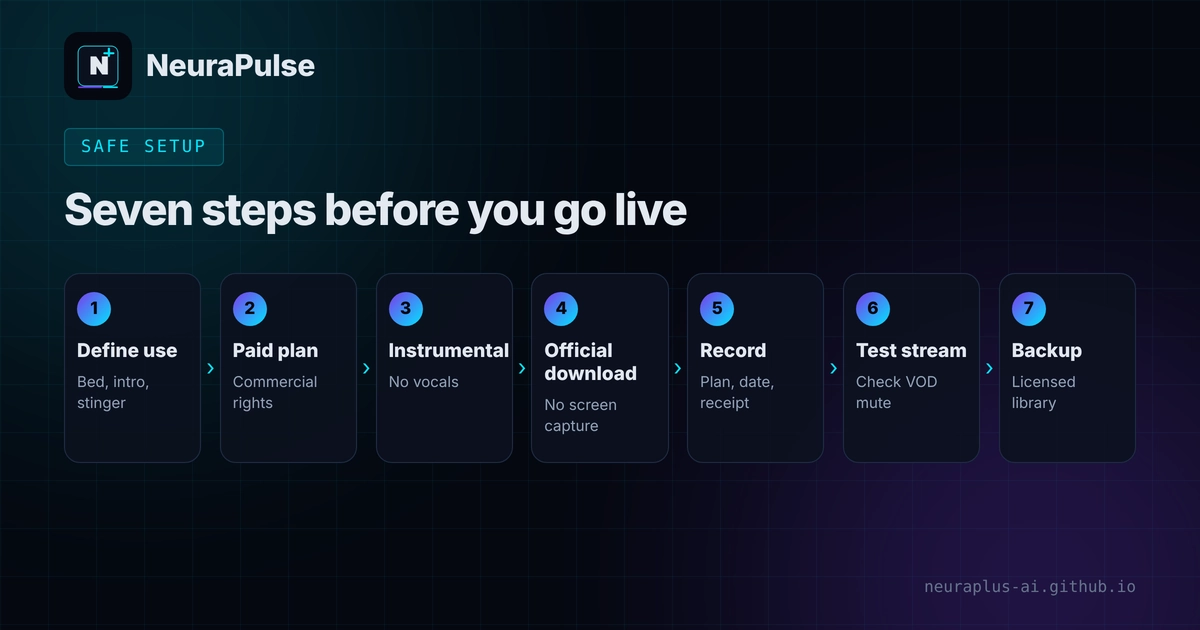
- Define the use. Always-on background, intro, stinger or break screen.
- Pick a plan with commercial rights. Do not use free-plan tracks on a monetised stream.
- Generate instrumentals. Vocals compete with your voice and raise the chance of a look-alike claim.
- Use the official download. No screen recordings or unofficial downloaders.
- Record everything. Tool, plan, date, prompt, file name and a copy of the terms.
- Test. Run a short private or low-stakes stream, then check the VOD for muted sections.
- Keep a backup. Have a licensed library playlist ready in case a claim appears.
Mistakes to avoid
- Playing your own streaming-service playlist.
- Assuming "royalty-free" means "claim-free". See our royalty-free AI music guide.
- Using free-plan AI songs on a monetised channel.
- Skipping records, then being unable to answer a dispute.
- Letting music sit loud over your voice. See free AI music for podcasts for mixing levels that also suit streams.
💡 Rule of thumb: If the stream could earn money, treat every track as commercial and keep proof. Compare plans in AI music generator pricing 2027.
How this guide was researched
Methodology and limits
- Twitch DMCA points and library prices come from one 2026 streamer guide with no stated date. It does not discuss AI music, and we could not confirm Twitch's AI-specific treatment.
- AI plan prices come from reviews dated June to October 2026. Sources disagree in places and we say so.
- We did not run live streams through each tool, and we make no claim about detection results.
- This is not legal advice. Read Twitch's current rules and your plan's terms.
- Author: Prashant Lalwani. Last verified November 19, 2026.