⚡ AI Image Generators · Speed
AI Image Generator Speed Test 2027: Reported Times and a 10-Minute Test You Can Run
Everyone wants the fastest AI image generator, but few speed claims survive a close look. Test prompts differ, load changes through the day and vendors rarely publish methods. This guide gives you the reported speeds from published sources, explains why they disagree and shows you how to run your own 10-minute test so you can decide with your prompts, not someone else's.
✅ Short answer: Reported times run from about 1 second for the fastest lightweight models to 40 to 60 seconds for complex prompts on the heaviest ones. Google's Nano Banana 2 is reported at roughly 1 to 3 seconds. ChatGPT and Midjourney are slower in most reports, but speed changes every few weeks.
Short answer: the speed range in 2027
Draft-speed models return an image in a few seconds, which feels interactive. Heavier models take 10 seconds or more, which feels like waiting. For a single image the difference is small. For a team generating hundreds of images, or an app where a user waits for a result, it adds up fast. If you are planning volume, read our guides on batch generation and API integration.
Read this first: these are not our measurements
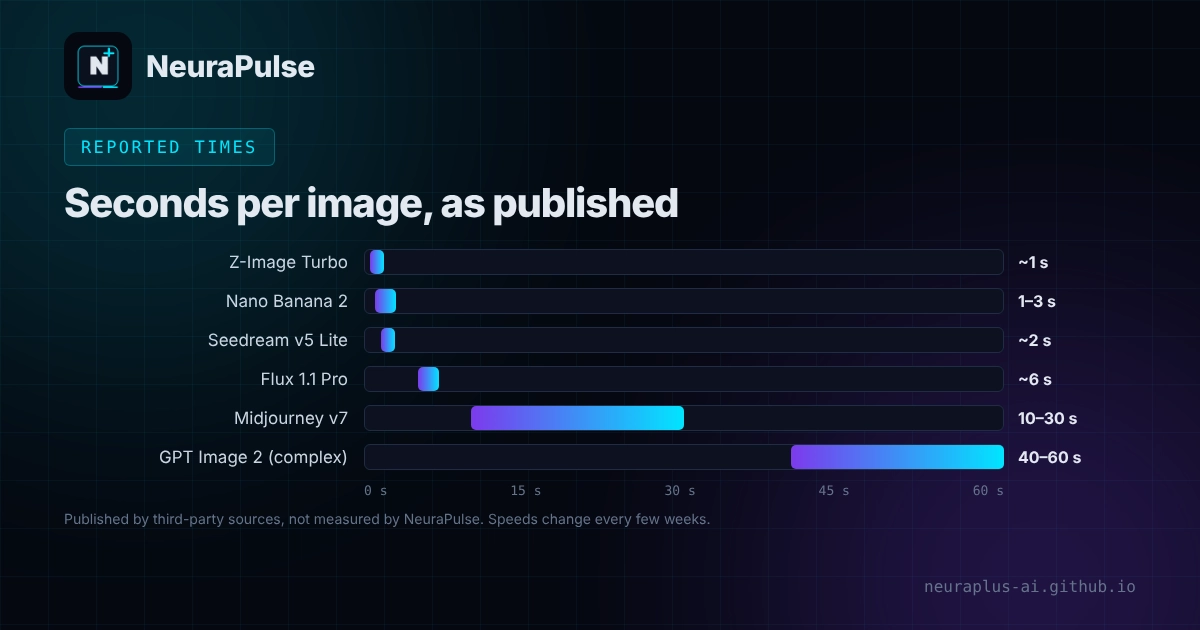
We did not run a lab test for this article, and we do not present one. The figures below are secondhand: a May 2026 roundup says it pulled times from published vendor leaderboards, and a September 2026 review of ChatGPT generation time says its numbers are synthesised from tester reports. Neither gives full test details such as prompts, hardware, sample size or image size. Use them to shortlist tools, not to settle an argument.
Reported generation times
| Model | Reported time per image | Source type | Notes |
|---|---|---|---|
| Z-Image Turbo | About 1 second | May 2026 leaderboard roundup | Listed at about $0.01 per image |
| Nano Banana 2 (Gemini 3.1 Flash Image) | 1 to 3 seconds standard; 4 to 6 seconds Pro tier | May 2026 leaderboard roundup | About $0.067 per image at 1K standard |
| Seedream v5 Lite | About 2 seconds | May 2026 leaderboard roundup | Reported to hold speed at high resolution |
| Flux 1.1 Pro | About 6 seconds | May 2026 leaderboard roundup | A separate review gives about 4 to 8 seconds for simple prompts |
| Midjourney v7 | 10 to 30 seconds standard; faster in turbo | May 2026 leaderboard roundup | Relax mode is slower by design |
| GPT Image 2 | About 15 seconds simple; 40 to 60 seconds complex | May 2026 leaderboard roundup | Images 2.5 reports up to 50 percent lower latency than 2.0 |
| GPT Image 1.5 | 3 to 8 seconds simple on paid plans; 12 to 25 seconds complex (one review); 15 to 45 seconds (another) | April to September 2026 reviews | The two sources disagree; the review also promotes a competing service |
| Design.com | Not tested | n/a | Logo and brand tool; not part of this speed review |
Figures are as published by the named sources, not verified by us. A September 2026 comparison also says the Flare variant of OpenAI's Images 2.5 is reported 2 to 4 times faster than GPT-Image-2, without giving seconds.
What changes speed
- Prompt complexity. Short prompts are fastest. Long prompts with many objects, text, lighting and aspect ratio instructions take longer.
- Image size and quality. 1024 pixel squares are quickest. 4K and "high" quality settings add time and cost.
- Plan and queue. Free users often share capacity. Paid plans can get priority. Midjourney's Relax mode trades speed for unlimited generations.
- Time of day. Reviews report slowdowns at peak hours.
- Model version. Vendors ship faster variants often. A number from May may be out of date in November.
- Your own code. Network time, retries and image download add to the wait in an app.
Speed versus quality versus cost
Speed alone is a poor way to choose. Faster models are often cheaper per image, which helps for drafts and volume, but they may follow complex prompts less closely or render text less cleanly. Slower, more precise models can save time if they need fewer retries. A tool that takes 40 seconds but gets it right on the first try can beat a 3 second tool that needs five attempts. Compare cost per usable image, as explained in AI image generator pricing 2027, and compare quality with the notes in AI image generator vs Midjourney.
Run your own 10-minute speed test
- Pick ten real prompts. Use five simple and five complex ones from your actual work, including at least one with text in the image.
- Fix the settings. Same size, same quality level and the same aspect ratio in every tool. Write them down.
- Run each prompt three times. Spread the runs across the day if you can, so a lucky quiet moment does not skew the result.
- Time to a usable image. Record the seconds from clicking generate to the image appearing, and also count how many tries it took to get one you would use.
- Report the median and the slowest run. Do not report only the best time. The slow run is what your users will remember.
A simple timing script for APIs
If you call an image API, this Python helper measures time per request and reports the median and the 90th percentile. Pass in your own function that makes one image request and returns when the image arrives.
import time, statistics

def time_it(generate, prompts, runs_per_prompt=3):
    times = []
    for prompt in prompts:
        for _ in range(runs_per_prompt):
            start = time.perf_counter()
            generate(prompt)  # your API call; returns when image bytes arrive
            times.append(time.perf_counter() - start)
    times.sort()
    return {
        "runs": len(times),
        "median_s": round(statistics.median(times), 1),
        "p90_s": round(times[int(0.9 * (len(times) - 1))], 1),
        "slowest_s": round(times[-1], 1),
    }
For a ready-made generate function, see the OpenAI and Gemini examples in our API integration guide.
How to make image generation faster
- Draft at a small size and low quality, then upscale or regenerate only the winners.
- Run requests in parallel, within your provider's rate limits.
- Use Batch pricing and queues for work that can wait. Google lists Batch at half price with results within up to 24 hours.
- Keep prompts short and put the important detail first.
- Show a placeholder and stream the result so users do not stare at a blank screen.
- Cache images for repeated prompts and never regenerate what you already have.
💡 Good default: Use a fast, cheap model for ideation and a slower, more precise model for the final image. That gives you speed where it helps and quality where it counts.
How this guide was researched
Methodology and limits
- Times come from a May 2026 roundup that cites published vendor leaderboards, an April to September 2026 review of ChatGPT generation time, and a September 2026 comparison of Images 2.5, Nano Banana and Midjourney V8.2.
- None of these sources gives full test methods, and they disagree in places. We show ranges and name the source type.
- We did not run our own timing tests and did not test Midjourney V8.2 or ChatGPT Images 2.5 speeds ourselves.
- Author: Prashant Lalwani. Last verified November 18, 2026.