📦 AI Image Generators · Marketing
Batch AI Image Generation for Marketing: Tools, Workflow and Real Costs
Generating one good image is a craft problem. Generating 300 consistent ones for a campaign is a workflow problem. The marketers who do it well treat prompts like data: a spreadsheet, a template, a batch run and a quality check. This guide gives you that workflow, the tools that fit each method and the real cost of a batch.
✅ Quick answer: Put your products, audiences and copy in a spreadsheet. Merge them into one locked prompt template. Run the rows through an API with Batch pricing if you can wait up to 24 hours, or through a subscription tool if you cannot code. Then review everything before it goes live.
Short answer: what batch generation is and who needs it
Batch generation turns a list of inputs into a list of images. It matters when you need volume with consistency: 40 product backgrounds, 12 ad variants for an A/B test, 30 days of social posts or the same campaign in five languages. If you only need a handful of images, our guide to the best AI image generator for marketing is a better starting point.
Three ways to generate images in bulk
- Prompt matrix in a UI tool. How it works: One template, swap a few variables, run many variants in a subscription tool. Best for: Small teams, up to dozens of images. Cost model: Flat subscription (for example Midjourney Standard at $30/mo with unlimited Relax). Trade-off: Manual steps; hard to scale or track.
- API with Batch pricing. How it works: Submit a file of requests; collect results later. Best for: Hundreds to thousands of images. Cost model: Per image; Batch can be half price. Trade-off: Needs code or automation; results can take up to 24 hours.
- No-code automation. How it works: Sheet or CRM row triggers a workflow that calls an image API and saves the file. Best for: Teams without developers. Cost model: API cost plus automation plan. Trade-off: More moving parts to maintain.
Batch pricing is described in vendor rate cards and dated reviews. Confirm current rates before you commit a large run.
If you want the no-code route, see our best n8n workflows for SEO and marketing automation and Zapier workflow ideas to save time in business. If you will write code, read the AI image generator API integration guide.
The six-step batch workflow
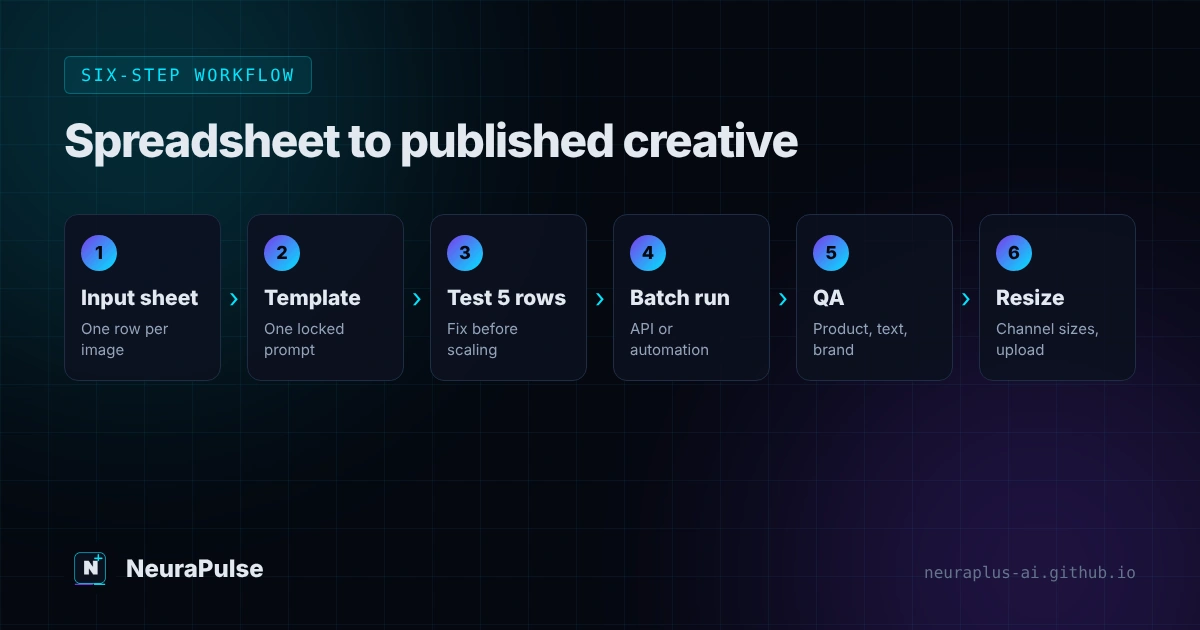
- Build the input sheet. One row per image. Columns: ID, product or topic, audience, scene, mood, aspect ratio, headline text (if any) and destination channel.
- Write one locked prompt template. Brand style, lighting, framing and "avoid" rules stay fixed. Only the variable parts change.
- Test five rows by hand. Fix the template before you spend on 500.
- Run the batch. Use a prompt matrix, an API Batch job or an automation. Save each result with its row ID in the filename.
- Review with a checklist. Reject and regenerate failures. Expect some.
- Resize and publish. Export channel sizes, add text in your design tool and upload with a naming scheme you can track.
A prompt template you can copy
Keep the structure the same on every row. Swap only the bracketed parts.
Photo-style image of [PRODUCT] in [SCENE], for [AUDIENCE].
Mood: [MOOD]. Lighting: soft natural daylight.
Brand look: clean, [BRAND COLORS], plenty of empty space for text.
Aspect ratio: [RATIO]. No text, no logos, no watermarks.
Avoid: extra fingers, warped labels, cluttered backgrounds.
Two habits make batches reliable. First, tell the model not to render text and add headlines yourself, because AI lettering is the most common failure. Second, keep one "seed" reference image or style description for the whole campaign so the set feels like one family. For prompt craft beyond this template, see best prompts for image generation and our walkthrough on how to make AI marketing images.
What a batch costs
Using published per-image prices, here is the cost of 500 images. It is simple multiplication and assumes one generation per image with no retries, so add 20 to 50 percent for rejects.
| Route | Per image | 500 images | Notes |
|---|---|---|---|
| Gemini 2.5 Flash Image, Batch | $0.0195 | $9.75 | Up to 24 hours; SynthID included |
| Gemini 3.1 Flash Image 1K, Batch | $0.034 | $17 | Higher quality tier |
| GPT Image 1 Mini, medium | $0.011 | $5.50 | Standard rate; lowest OpenAI option listed |
| GPT Image 2 estimate, medium | $0.053 | $26.50 | Batch tokens are listed at $15 per 1M versus $30 standard |
| FLUX.2 [pro] (from) | $0.03 | $15 | Prepaid credits |
| Midjourney Standard | Not billed per image | $30 flat for the month | Relax mode is unlimited; no official API |
| Design.com | Not an API route | n/a | Useful for logos and brand kits alongside batch image work |
Prices from vendor rate cards and dated reviews, August to November 2026. See AI image generator pricing 2027 for the full comparison.
Do not automate Midjourney with unofficial tools. Midjourney has no official public API as of an October 2026 report, and automating your account can violate its terms and risk a ban. Use an official API route for batch work.
Channel sizes to export
- Square feed post: 1080 × 1080 px (1:1)
- Story or vertical video cover: 1080 × 1920 px (9:16)
- Link ad or blog header: 1200 × 628 px (about 1.91:1)
- YouTube thumbnail: 1280 × 720 px (16:9)
- Product page image: Follow your store's guideline (Often 1:1)
Platforms update their size recommendations. Check the placement specs before you finalise a template.
Generate once at a slightly larger size than you need, then crop, rather than regenerating for each channel. For product-led work, see AI image generator for ecommerce and how to make AI product photos.
Quality control that protects your brand
- Check the product. Colour, shape, size and any label must match the real item. Never publish an image that misleads buyers.
- Check hands, faces and text. Reject any image with warped fingers, strange lettering or an uncanny face.
- Check the brand. Palette, tone and logo placement should follow your guidelines.
- Check rights and disclosure. Confirm the plan's commercial terms and the ad platform's AI policy.
- Check the metadata. Keep a log of tool, model, date and row ID. See our watermark guide for content-credential notes.
💡 Reject rate: Track it. If more than a third of a batch fails review, fix the template before you run more. A cheap bad batch costs you review time, not just credits.
Tools worth shortlisting
Match the tool to the method. For design-led teams, our best AI image generator for designers comparison covers typography, vectors and licensing. For wider campaign planning, see best AI tools for digital marketing 2026.
How this guide was researched
Methodology and limits
- Pricing and Batch-discount details come from vendor rate cards and dated reviews published between August and November 2026.
- The workflow and QA checklist are a method to adapt, not a guarantee of results. Test five rows before every batch.
- We did not run a 500-image batch for this article, and we do not claim measured rejection rates.
- Author: Prashant Lalwani. Last verified November 13, 2026.