🔌 AI Image Generators · API
AI Image Generator API Integration Guide: Code, Costs and Safe Defaults
Adding image generation to an app takes an afternoon. Making it safe, affordable and reliable takes a bit more planning. This guide shows you how to choose a provider, structure the integration, call two major APIs from Python and avoid the mistakes that cause surprise bills, leaked keys and broken launches.
✅ Short answer: Pick an official API, call it from your server, queue the work, cap the spend, store the files yourself and log every request. Start with the cheap, fast model and move up only where quality demands it.
Short answer: what an integration needs
Every image feature, whether it powers a product page, a design tool or a marketing automation, needs the same six pieces: an API key kept on the server, a prompt builder, a job queue, a retry policy, storage for the output and a cost guard. If you are still choosing between tools for non-developers, start with our designer comparison.
Choose a provider: API options compared
| Provider | Models mentioned in 2026 sources | Pricing style | Good for | Watch out for |
|---|---|---|---|---|
| OpenAI | GPT Image family; 2.5 models shipped September 8, 2026 | Tokens, with per-image estimates by quality and size; Batch available | Prompt-following, editing, product apps | Model names change; 2.5 per-image costs may differ from older estimates |
| Google Gemini API | Nano Banana family | Per image by model and resolution; Batch at half price | Fast, cheap edits and batch jobs | All images include SynthID; free-tier data may be used by Google |
| Black Forest Labs (Flux) | FLUX.2 [pro] and smaller models | Prepaid credits, about $0.01 each | Quality at a low per-image price | Open-weights dev models are non-commercial only |
| Stability AI | Stable Image Core and Ultra | Credits worth $0.01 each; 25 free to start | Developers who want control over the interface | No built-in gallery or canvas |
| Midjourney | None official | Subscription only | Not for programmatic use | Unofficial wrappers risk account bans |
| Design.com | n/a | Check Design.com | Logos and brand assets rather than API image generation | We did not review an API for this tool |
Sources: vendor rate cards and dated reviews, August to November 2026. Model IDs and prices change, so confirm in the provider's dashboard before you build.
Not sure what you will spend? Run your numbers through the per-image rates in AI image generator pricing 2027. If you are weighing hosted APIs against running models yourself, see Ollama vs OpenAI API comparison.
A simple architecture that scales
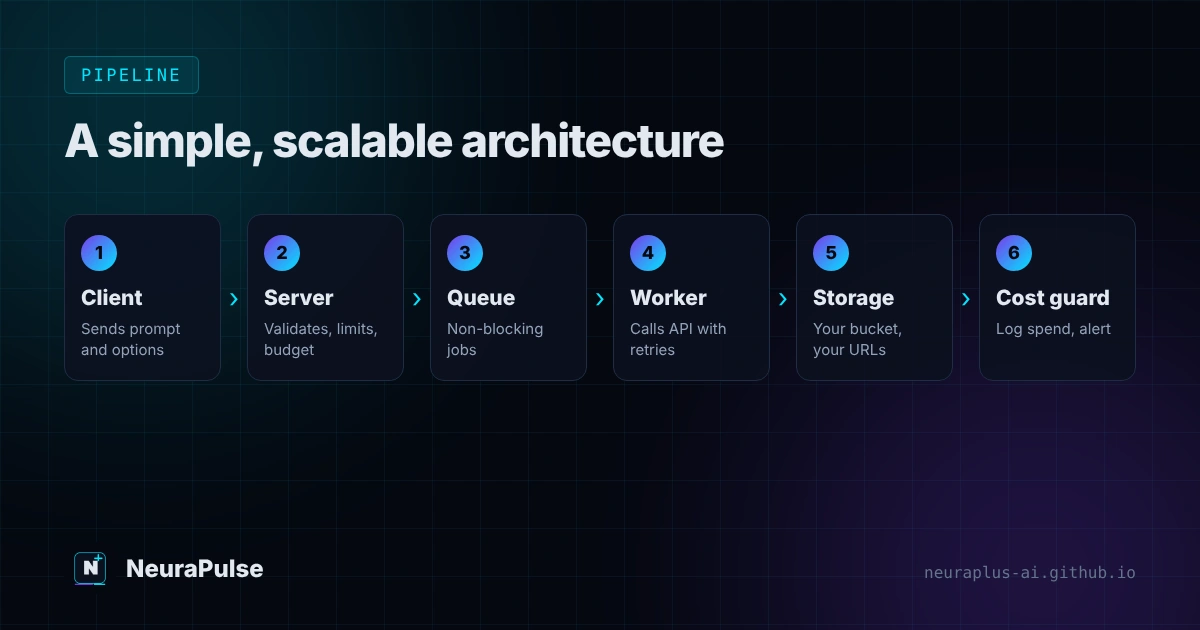
- Client sends a request to your server with a short text prompt and options from a safe list.
- Server validates it. Check the user, the rate limit, the budget, the size and quality settings and the prompt policy.
- Job goes into a queue. Image calls can take many seconds, so do not block your web request.
- A worker calls the provider with retries and a timeout.
- The worker saves the file to your own storage, records the cost and metadata, and marks the job done.
- The client polls or receives a webhook and shows the image from your storage URL.
OpenAI example in Python
This minimal example uses the official OpenAI Python SDK and reads the key from an environment variable. Model IDs change, so the model name comes from an environment variable too. Confirm the current ID in your OpenAI dashboard. A 2026 review lists gpt-image-2.5-flare as the fast default and gpt-image-2.5-sunburst for precision edits.
import os, base64
from openai import OpenAI

client = OpenAI()  # reads OPENAI_API_KEY from the environment
MODEL = os.environ.get("IMAGE_MODEL", "gpt-image-1")

def generate(prompt, size="1024x1024", quality="medium"):
    result = client.images.generate(
        model=MODEL,
        prompt=prompt,
        size=size,
        quality=quality,
    )
    image_bytes = base64.b64decode(result.data[0].b64_json)
    return image_bytes

if __name__ == "__main__":
    img = generate("Flat vector icon of a lighthouse, teal and white, no text")
    with open("lighthouse.png", "wb") as f:
        f.write(img)
Start at quality="low" in development. Per-image estimates in 2026 reviews run from about $0.006 at low quality to about $0.211 at high quality for a 1024px square, so a testing loop at high quality burns money quickly.
Gemini example in Python
Google's SDK returns image data inside the response parts. The model ID below was current for the Nano Banana family when we wrote this, but check Google's documentation because versions change quickly.
import os
from google import genai

client = genai.Client()  # reads GEMINI_API_KEY from the environment
MODEL = os.environ.get("GEMINI_IMAGE_MODEL", "gemini-2.5-flash-image")

def generate(prompt):
    response = client.models.generate_content(model=MODEL, contents=[prompt])
    for part in response.candidates[0].content.parts:
        if part.inline_data is not None:
            return part.inline_data.data  # raw image bytes
    raise RuntimeError("No image returned")

if __name__ == "__main__":
    data = generate("Product photo of a ceramic mug on a wooden table, soft daylight")
    with open("mug.png", "wb") as f:
        f.write(data)
Google states that all images from the Nano Banana API include a SynthID watermark. It is invisible, but you should tell users and clients that outputs may carry provenance signals. See our watermark guide for what that means.
Retries, timeouts and budgets
Image APIs fail in ordinary ways: rate limits, timeouts and temporary server errors. Treat them as normal.
import time, random

def with_retries(fn, attempts=4):
    for i in range(attempts):
        try:
            return fn()
        except Exception as e:
            if i == attempts - 1:
                raise
            time.sleep((2 ** i) + random.random())  # exponential backoff + jitter

DAILY_CAP_USD = 25.0
def allowed(spent_today_usd, est_cost_usd):
return spent_today_usd + est_cost_usd <= DAILY_CAP_USD- Retry only on rate-limit, timeout and 5xx errors. Do not retry policy rejections.
- Set a hard timeout so a stuck call cannot hold a worker forever.
- Record cost per request, estimated from the model, quality and size, and alert when daily spend crosses a threshold.
- Use the provider's Batch endpoint for non-urgent jobs. Google lists Batch at half the standard price, and OpenAI lists Batch image output tokens at $15 versus $30 per million. See batch AI image generation for marketing for the workflow.
Security and safety checklist
- Keep API keys on the server and in environment variables or a secrets manager. Never ship them in browser or mobile code.
- Rate-limit every user and cap daily spend per user and per project.
- Whitelist sizes, quality levels and styles. Do not pass raw user options to the provider.
- Treat user prompts as untrusted input. If a model builds prompts from user text or web content, read prompt injection attacks explained.
- Apply provider safety settings and your own content policy, and provide a way to report and remove images.
- Store files in your own bucket. Provider URLs may expire.
- Log prompt, model, size, cost, user ID and request ID for audits and support.
- Check licensing and terms for your use case. Some open-weights models, such as FLUX.2 [dev], are non-commercial only.
Cost planning before you launch
Use per-image prices from your chosen provider, then multiply by expected volume and expected retries. At published rates, 1,000 images cost about $11 at GPT Image 1 Mini medium, $30 at FLUX.2 [pro] starting prices, $39 on Gemini 2.5 Flash Image ($19.50 with Batch) and $211 at high quality on the GPT Image 2 estimate. That spread is why a model switch can matter more than any code optimisation.
If your app wraps several providers, build an adapter layer so you can swap models without rewriting your product. If you also use text models, our Groq API guide shows the same key-handling and retry patterns for fast chat features, and the n8n workflow ideas show how to connect an image API to a spreadsheet without writing a server.
Pre-launch checklist
- Confirm the model ID, price and rate limits in the provider dashboard today.
- Test with low quality and small sizes. Move up only where users notice.
- Run 50 realistic prompts, including bad ones, and review the output and the failures.
- Add rate limits, a spending cap and an alert.
- Store results in your own storage and test deletion.
- Document your terms, disclosure and takedown process.
💡 Developer tip: Build the first version around one model and one image size. Most teams over-engineer providers before they know what users actually generate.
How this guide was researched
Methodology and limits
- Prices and model names come from vendor rate cards and dated reviews published between August and November 2026. They change often.
- The code samples follow the official Python SDK patterns for OpenAI and Google. We did not run them against live keys for this article, so test them in your own environment and adjust model IDs.
- Security guidance reflects standard API engineering practice and is not a substitute for your own security review.
- Author: Prashant Lalwani. Last verified November 13, 2026.