🚫 AI Image Generators · No Watermark
AI Image Generator Without Watermark: What Is Actually Free and Usable
The short answer: you can find AI image generators that export clean images, but "no watermark" is not one thing. A tool can leave your picture unmarked and still make it public, limit it to personal use or embed an invisible signal. Before you pick a tool, check four things: the visible mark, the invisible mark, the privacy of your images and the licence.
✅ Bottom line: For anything you will publish or sell, a paid plan with stated commercial terms is the safe route. For casual use, free tiers can work if you test the export first.
Short answer: what "without watermark" should mean
When people search for an AI image generator without a watermark, they usually want one result: an image they can put on a blog, a slide or a product page without a logo or label in the corner. That is the visible-mark question. It is only one of four, and the other three decide whether you can legally and safely use the image.
The four meanings of "no watermark"
- Visible watermark. A logo or text stamped on the image. Some tools remove it on paid plans or on specific export paths.
- Invisible watermark. A signal embedded in the pixels. Google states that all images from its Nano Banana API include a SynthID watermark. You will not see it.
- Content credentials. Metadata attached to the file that can say it was AI-generated. Editing or exporting may remove it, but that does not change the origin.
- Public gallery and licence. Some free plans publish your creations or do not allow commercial use. This is not a watermark, but it matters more for business use.
If you just want a quick, no-account test, start with our list of AI image generators without login. If you want more control, keep reading.
Tool-by-tool table: free access, output and catches
This table separates what we could confirm from what you must test. Watermark rules change, so the last column is the most important.
| Tool | Free access | What we found | Catch to check |
|---|---|---|---|
| Midjourney | No confirmed free plan; paid from $10/mo | A dated review lists no watermark on generated images | Companies over $1M revenue need Pro or Mega |
| Leonardo.Ai | About 150 tokens a day | Dated reviews state free output is watermark-free | Free creations are public; private from Essential ($12/mo) |
| Ideogram | Weekly free credits | Commercial use allowed on free plan per a dated review | Free images are public; private from Plus ($20/mo) |
| Adobe Firefly | Small monthly credit allowance | A review says final exports have no watermark | Confirm on the export screen; partner models have different terms |
| Recraft | Free plan | Public images | Free images are not licensed for commercial use; paid plans are |
| Canva Magic Media | Limited free uses | A review lists no watermark | Check template and element licences separately |
| ChatGPT Images | Free tier with caps | Caps are not published as exact numbers | Check metadata and the current terms |
| Gemini API (Nano Banana) | Free and paid tiers | Google states SynthID is included in all outputs | Free-tier generations may be used to improve Google products |
| Flux (open weights) | Download and run yourself | You control the pipeline | FLUX.2 [dev] is non-commercial only without a commercial licence |
| Stable Diffusion (API) | 25 free credits to start | Developer platform with per-credit billing | You build the interface and handle your own compliance |
| Design.com | Check Design.com for current free options | We did not verify its watermark policy | Test an export and read the licence first |
Sources: dated reviews published April to November 2026 and vendor statements where noted. Several reviews do not tie watermark claims to a specific plan, so we did not either. Test before you rely on it.
The two-minute test before you trust any tool
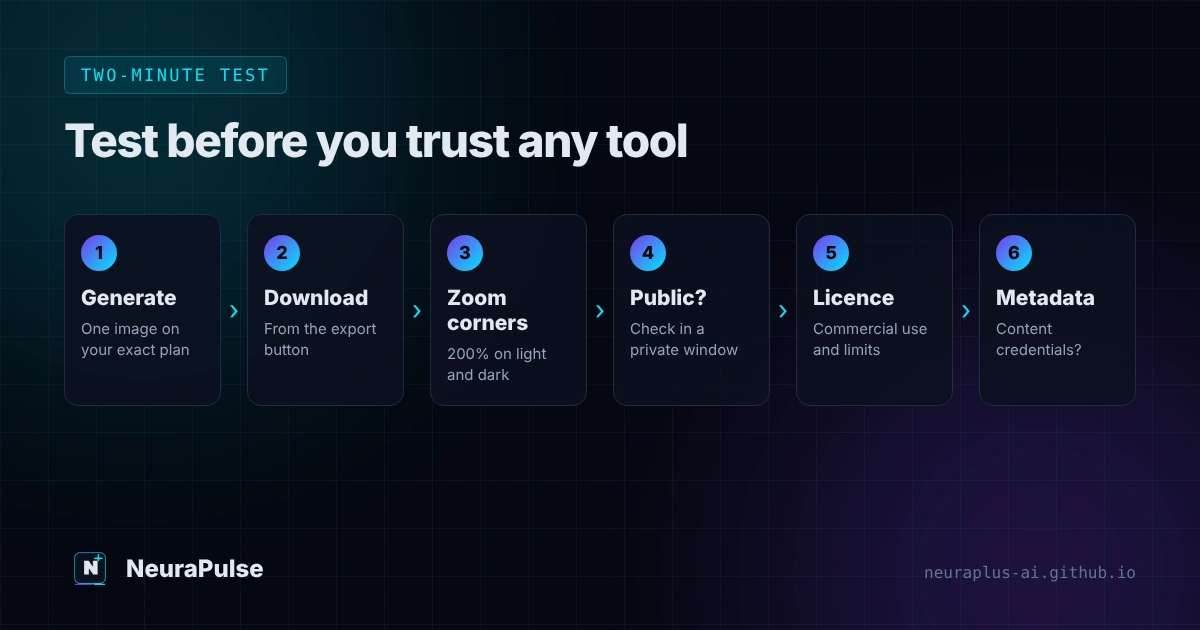
- Generate one image with a plain prompt on the exact plan you will use.
- Download the file from the final export button, not a screenshot of the preview.
- Zoom into every corner at 200 percent on a white or dark background to spot faint logos.
- Check the gallery setting. Open an incognito window and see if your image is publicly visible.
- Read the licence for your plan: commercial use, ownership, revenue limits and resale.
- Look at the metadata. If it carries content credentials, decide whether that is acceptable for your project.
Heads up: A tool that is "watermark-free" in a review may not be watermark-free on today's free plan. Companies change policies, and review sites often copy each other. The test above takes two minutes and saves you from a retake.
When a paid plan is the better answer
A free plan costs nothing until it costs you a reshoot. Pay when any of these are true:
- The image will appear in client work, ads or products you sell.
- Your prompt contains private product details or unreleased designs.
- You need a licence you can show to a client or platform.
- You generate in bulk, where free allowances run out in a day.
Entry plans are cheaper than most people expect: roughly $8 to $12 a month at several tools. Our AI image generator pricing 2027 guide shows every plan side by side, and our guide to the best AI image generator for designers explains which tool suits which task.
Legitimate ways to get clean AI images for free
- Use free tiers that state private or commercial rights for low-stakes work, then confirm the export.
- Use official APIs with documented output rules and small free credits. Our API integration guide shows how.
- Run an open model locally if you have the hardware and the licence allows your use.
- Write better prompts so you waste fewer free credits. See best prompts for image generation.
- Pick tools built for your use. Bloggers should see best AI image generator for blogs, and beginners can start with how to create AI art.
Should you remove a watermark with a third-party tool?
No. Watermark removers often break the tool's terms, can be unreliable and may carry privacy risks. More importantly, removing provenance signals to make an image look human-made can mislead audiences and may breach platform rules or local law. If a visible mark is the only problem, move to a plan that does not add one. If you need to disclose AI use, do it plainly.
💡 Good habit: Keep a small record for every published AI image: tool, plan, date, prompt and where it was used. If someone questions the image later, you can answer in a minute.
How this guide was researched
Methodology and limits
- We reviewed vendor statements where available (for example Google's note that Nano Banana API images include SynthID) and dated third-party reviews published between April and November 2026.
- Third-party watermark claims were reported as claims, not verified facts, and are labelled that way in the table.
- We did not independently export images from every tool for this article. That is why we show you the two-minute test instead of promising a result.
- Author: Prashant Lalwani. Last verified November 13, 2026.