⚖️ AI Image Generators · vs Photoshop
AI Image Generator Advantages Over Photoshop: Where AI Wins and Where It Does Not
The question is not whether AI will "beat" Photoshop. It is which tool gets you to a good result with the least waste. This guide lists the real advantages of an AI image generator over Photoshop, says honestly where Photoshop still wins, and shows what each costs so you can choose with numbers instead of hype.
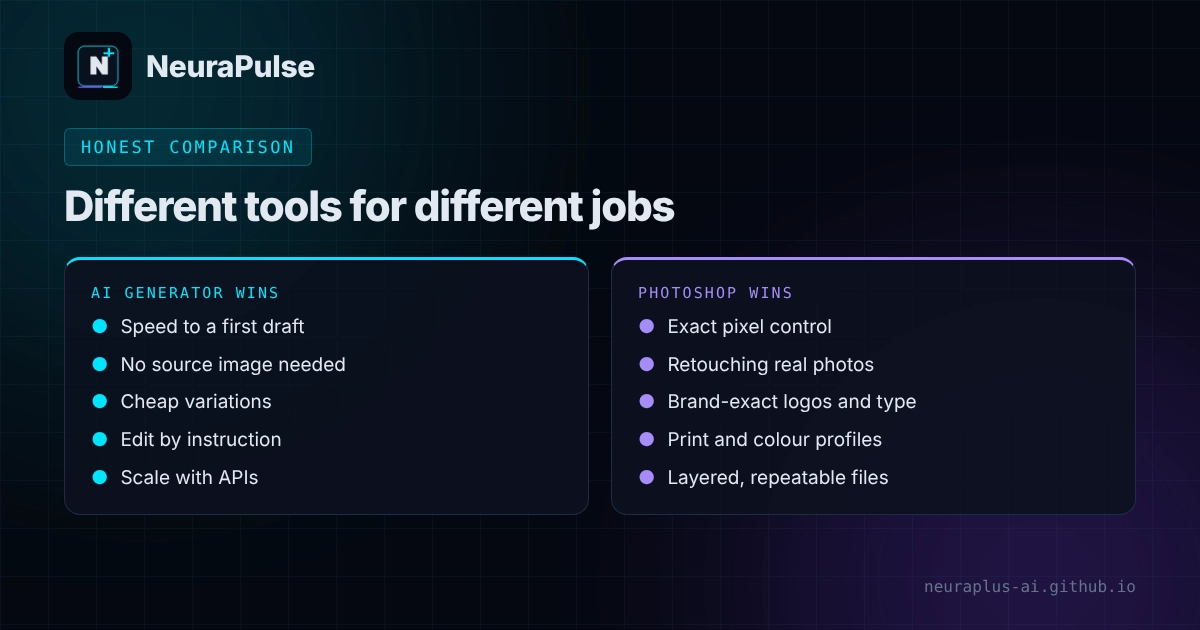
✅ Short answer: AI wins on speed to a first draft, cost per variation, ideation and scale. Photoshop wins on exact control, layered editing, retouching real photos and print-ready finishing. Most teams get the best result by using AI for the draft and Photoshop for the finish.
Short answer: different tools for different jobs
Photoshop edits pixels you already have. An AI image generator creates pixels from a description. That single difference explains almost every advantage and limit below. If you want a tool comparison rather than a method comparison, start with best AI image generator for designers or Canva AI vs Adobe Firefly.
7 advantages of an AI image generator over Photoshop
- Speed to a first draft. You can see ten directions in the time it takes to open and set up a Photoshop file. Reported generation times for fast models run from about 1 to 6 seconds. See our speed test guide.
- No source image required. Photoshop needs a photo or a drawn base. A generator can create a scene, product mockup or illustration that does not exist yet.
- Lower skill barrier. Describing what you want is easier than learning selections, masks and layers. That helps marketers, founders and bloggers who are not designers.
- Cheaper variations. Changing a colour, background or season is a new prompt, not a new retouching job. At API rates this can cost a few cents per image. Our pricing guide has the numbers.
- Wider ideation. AI is good at surprising you. It can show 30 moodboard directions before a client has finished a coffee.
- Scale and automation. A spreadsheet and an API can produce hundreds of images. Photoshop automation exists, but it is built around editing existing files. See batch AI image generation for marketing.
- Edit by instruction. Modern tools let you say "change the background to a kitchen" instead of masking and compositing by hand. This is reported to be a strength of ChatGPT Images 2.5 and Gemini's Nano Banana models.
Where Photoshop still wins
- Exact control. Layers, masks, curves and selections let you change one pixel or one object without touching anything else.
- Retouching real photos. Skin, product surfaces, dust, stitching and reflections are safer to fix by hand than to regenerate.
- Brand-exact work. Logos, fonts, labels and colour values need to be right. AI lettering and logos can drift.
- Print and colour management. Resolution, colour profiles and file formats for print are a Photoshop strength.
- Repeatable, non-destructive workflows. Smart objects, adjustment layers and saved actions make results consistent.
- Clearer production habits. Agencies and clients already know how to review layered PSD files.
Photoshop has AI too
The comparison is not a clean "AI versus Photoshop" any more. Adobe sells generative features inside its own tools. A pricing review dated October 2026 lists Firefly Pro at $19.99 a month with 4,000 generative credits, available on web and mobile only, with no desktop app. Photoshop plans include generative tools, but the review does not state the credit amounts for each plan, so check Adobe's current plan details. Adobe also positions its own Firefly models as trained on licensed content, which matters for commercial teams. For the details, see Canva AI vs Adobe Firefly 2026.
Cost comparison
Here is what the main options cost. Photoshop prices are Adobe's US list prices read in October 2026. The other prices come from vendor pages and dated reviews checked in October and November 2026.
| Option | Starting price | Best for | Limit |
|---|---|---|---|
| Photoshop (individuals) | $22.99/mo, annual plan billed monthly | Layered editing, retouching, print finishing | Learning curve; no month-to-month price listed |
| Creative Cloud Pro | $69.99/mo ($34.99 for first 3 months for new subscribers) | Photoshop plus 20+ apps | Heavy if you only need images |
| Photoshop for teams | $37.99 per license/mo | Business features, shared work | Per-seat cost adds up |
| Adobe Firefly Pro | $19.99/mo, 4,000 credits | Generative images on web and mobile | No desktop app |
| ChatGPT Images 2.5 | Free tier; Plus $20/mo | Instruction-led edits, readable text | Limits are not published as exact numbers |
| Gemini Nano Banana | Free access in the Gemini app; API from about $0.039 per image | Fast edits, 4K output | No native transparent backgrounds |
| Midjourney | Basic $10/mo | Concept art and mood-led images | No API; weak at precise edits |
| Design.com | Check Design.com for current plans | Logos and brand kits | Not a general photo editor |
Photoshop prices: Adobe US list prices as read in an October 2026 review. Others: dated vendor information, October to November 2026. Confirm before buying.
How to choose
Concepts, moodboards, social graphics, blog headers and quick variations where perfection is not required.
Product retouching, composites, print files, logos and anything a client will inspect at 100 percent zoom.
Generate options with AI, then finish text, edges and colour in Photoshop. This is the most common professional workflow.
Documentary, testimonial and evidence images should be photographed, not generated.
A hybrid workflow that works
- Brief. Write the audience, size, mood and must-have text.
- Generate wide. Make 20 to 40 options in an AI tool. Use strong prompts and realistic photo settings where needed.
- Pick one direction. Choose the strongest composition, not the prettiest detail.
- Finish in Photoshop. Fix hands, edges and text, match colour and add real type in your layout.
- Check rights. Confirm the plan's commercial terms and keep a record of the tool and date.
- Export. Save the final size and keep a layered master.
How this guide was researched
Methodology and limits
- Photoshop and Firefly prices come from a pricing review published in October 2026 that read Adobe's US list prices on October 10, 2026. Adobe's plans, credit amounts and offers change often.
- AI tool prices and capability notes come from dated reviews and vendor information from September to November 2026.
- Advantages and limits describe how the tools are built and how reviewers report them. We did not run a side-by-side editing benchmark for this article.
- Author: Prashant Lalwani. Last verified November 18, 2026.