🛒 AI Image Generators · Ecommerce Tutorial
AI Image Generator Tutorial for Ecommerce: Product Photos Step by Step
You do not need a studio to produce clean product images, but you do need a method. Anyone can type a prompt and get a pretty picture. A seller needs the right picture: the real product, on the right background, at the right size, that matches what the customer will receive. This tutorial walks through that process in seven steps.
✅ Short answer: Photograph your product cleanly with a phone, use an AI editor to change the scene around it, check every image against the real item, export to each marketplace's size rules and test before you replace what already sells.
Short answer: what AI can and cannot do for product images
AI image tools are good at backgrounds, lighting, lifestyle scenes, seasonal variants and quick concept images. They are risky for anything where fine detail has to be exact: logos, ingredient labels, stitching, size and colour. Treat the generator as a scene builder and treat your own photo as the source of truth. For a wider overview of tools, see AI image generator for ecommerce and best AI tools for ecommerce.
Before you start: what to prepare
- A clean source photo of every product, shot in soft, even light with the whole product in frame. A phone is enough.
- A shot list for each product: main image, lifestyle, detail, scale and in-use.
- Brand notes: colours, mood, who the buyer is and what the product replaces.
- The product facts: true size, colour names and any text that must appear on the pack.
- A place to keep records: a sheet with product ID, tool, plan, date and prompt for every image.
Pick the right tool for each ecommerce job
One tool rarely does everything well. This table shows where each major option fits. Prices were checked in October and November 2026.
| Tool | Best ecommerce job | Starting price | Heads-up |
|---|---|---|---|
| ChatGPT Images 2.5 | Precise edits, readable text, transparent backgrounds | Free tier; Plus $20/mo; API from under $0.01 to about $0.21 per image | API is billed per token, so costs are harder to predict |
| Gemini Nano Banana | Conversational edits, subject consistency, 4K output | API about $0.039 at 1K, $0.134 at 2K, $0.24 at 4K | No native transparent background |
| Midjourney V8.2 | Mood-led lifestyle and campaign scenes | Basic $10/mo | No API; weak at precise edits and small text |
| Adobe Firefly and Photoshop | Final cleanup, retouching and layered edits | Firefly Standard $9.99/mo; Photoshop $22.99/mo | Generative credits are limited per plan |
| Design.com | Logos and brand kits for your store identity | Check Design.com for current plans | Brand assets, not product photography |
Sources: dated vendor pricing pages and reviews from September to November 2026. Confirm before you buy. See AI image generator pricing 2027 for every plan.
The 7-step tutorial
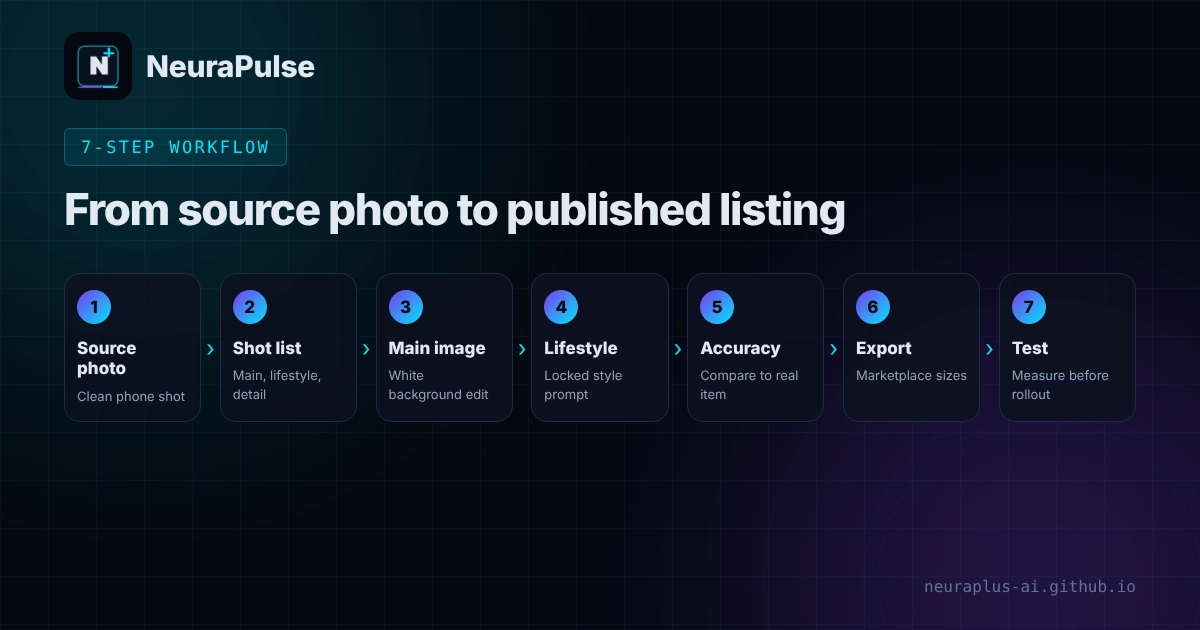
- Shoot a clean source photo. Use a plain surface, soft window light and a steady phone. Take the front, the side and one detail. The better the source, the less the AI has to invent.
- Write the shot list. For each product list the main image, two lifestyle scenes, one detail and one scale image. Decide the aspect ratio for each channel now, so you do not recrop later.
- Make the clean main image. Upload your photo to an editing-capable tool and ask it to remove the background and place the product on pure white with soft contact shadow. Do not ask it to redraw the product.
- Build the lifestyle scenes. Use the same source photo and describe the setting, light and mood. Keep a locked style sentence so the whole catalogue feels like one brand. See how to generate AI backgrounds.
- Check accuracy. Put the image next to the real product. Compare colour, proportions, labels, stitching, ports and any text. Reject anything that is even slightly off.
- Export to marketplace specs. Resize and compress for each channel, name files clearly and keep the originals.
- Test before you replace. Change a few products first, compare conversion and returns over a few weeks and only then roll out. Our case study guide shows how to run a fair test.
A prompt pack you can copy
These prompts work as starting points in tools that accept an uploaded photo. Replace the brackets with your own details.
MAIN IMAGE (edit the uploaded photo)
Keep the product exactly as it is. Remove the background and place it
on a pure white background (RGB 255,255,255) with a soft, realistic
contact shadow. Do not add text, logos, props or reflections.

LIFESTYLE SCENE
Place the same product, unchanged, on [SURFACE] in [ROOM OR SETTING].
Soft natural light from the left, shallow depth of field, [MOOD].
Leave empty space at the top for text. Do not alter the product.

DETAIL CLOSE-UP
Zoom in on [FEATURE]. Keep every detail exactly as in the photo.
Neutral background, sharp focus, no added text.
Two habits make a big difference. First, always say "do not alter the product" and then check anyway. Second, generate lifestyle scenes in a batch with one locked style sentence, then pick the best. For prompt craft beyond ecommerce, read best prompts for image generation.
Marketplace rules to check before you upload
Rules change, and each channel enforces its own. Here is what a third-party summary dated February 2026 reported for Amazon main images. Confirm each point in Seller Central before you rely on it.
- Pure white background, RGB 255, 255, 255.
- At least 1000 pixels on the longest side, with 1600 pixels or more recommended.
- The product should fill 85 to 100 percent of the frame.
- No text, logos, watermarks or promotional graphics on the main image.
- One product only, with no props that are not part of the purchase.
- JPEG is preferred; PNG, TIFF and GIF are also accepted.
- Amazon may replace seller images it considers poor, so incomplete galleries carry more risk.
For your own store, choose one aspect ratio per product and keep it consistent across the gallery. A store with mixed crops looks unprofessional faster than one with simple images.
Accuracy, returns and customer trust
The biggest risk with AI product images is not ugly pictures. It is a mismatch between the photo and the parcel. A report from Kaptur cites a 22 percent ecommerce return figure from Photoroom linked to items looking different in person, and a Stylitics and Aha Studio survey found 37 percent of shoppers check return policies more carefully when they know an image is AI-made. Gartner research (1,539 US consumers, March 2026, as reported by Kaptur) found half of consumers prefer brands that avoid generative AI in consumer-facing content.
- Keep the product itself real. Use AI for context, not for features.
- Include at least one unedited photo in every gallery.
- Describe the size, material and colour in text so images do not carry the whole promise.
- Follow platform and local rules on disclosing AI-made images. Our guide on watermarks and content credentials explains what files may carry.
💡 Practical rule: If a customer could say "that is not what I received" about any detail in the image, fix the image before you publish it.
Scale up without losing control
Once the workflow works on five products, turn it into a repeatable process: one spreadsheet, one locked prompt template and a review checklist. Our guide to batch AI image generation for marketing covers that, and the API integration guide shows how to connect an image API to your catalogue. If you want to compare tools for speed first, read the speed test guide. To weigh AI against traditional editing, see AI image generator advantages over Photoshop.
How this guide was researched
Methodology and limits
- Tool capabilities and prices come from dated reviews and vendor pricing information published between September and November 2026.
- The Amazon image rules come from a third-party summary dated February 16, 2026, not from Amazon's own policy text. Check Seller Central.
- The consumer statistics are as reported by Kaptur from Gartner, Photoroom and Stylitics research. We did not review the original studies, and some come from vendors.
- We did not run a product-photo test for this article, so we do not claim conversion results.
- Author: Prashant Lalwani. Last verified November 18, 2026.